I began this investigation with a narrow question: how much did Outplayed rely on responses produced locally by the Overwolf Core when deciding which features to enable?
Instead of starting with the interface or server traffic, I went straight to OverWolf.Client.Core.dll. The assembly contained part of the logic used by extensions and exposed methods related to the subscriptions associated with each one. My first approach was to replace the IL bodies of those methods, write the modified DLL to disk, and observe the result.
The new body worked in a fixture. In the real application, however, the launcher rejected the DLL before the modified code had any chance to run. The investigation was no longer limited to the contents of the IL. I needed to understand the entire path from the installed file through validation and, finally, JIT compilation.
This post retraces the path from persistent rewriting on disk to an in-memory intervention between DLL validation and JIT compilation.
TL;DR
Analysis of OverWolf.Client.Core.dll revealed two methods capable of influencing local responses consumed by Outplayed. My first approach rewrote those methods directly in the file, but the launcher used WinTrust to validate the Authenticode signature of installed DLLs. Merely opening and rewriting a clean copy with Mono.Cecil made validation fail, even though a comparison of 16,992 methods found no differences. I therefore kept the original file intact and used the CLR profiling API to supply a different IL body during JITCompilationStarted, before native compilation. The experiment changed two local responses only for the Outplayed UID. It did not create a server-side subscription or make the entire account premium. But, in the extensions perspectivy, locally, all premium features became completely available.
The entry point: local responses consumed by Outplayed
Outplayed is an Overwolf extension that automatically records gameplay. In the version I analyzed, the interface displayed ads and kept some features behind a premium plan.


Figure 1. Drag the divider to compare Outplayed before and after instrumentation.
Following the flow behind those decisions led me to the Overwolf Core. The question became more specific: could I change a local response for one UID without changing the account state on the server?
My first hypothesis was an IL compatibility issue. A method signature might have changed, a property might now use a different type, or the structure expected by the Core might have changed between versions. I found one real mismatch of this kind, but it explained only part of the problem.
First approach: rewriting IL in the file
Overwolf provides shared infrastructure for extensions, including game integration, overlays, events, video capture, and other APIs. Some of that behavior lives in OverWolf.Client.Core.dll, a .NET assembly consulted by applications installed on the platform.
When Outplayed asks the Core which subscriptions belong to an extension, the decision can be changed in two places: the code that interprets the response, or the response produced by the Core. I chose to investigate the second path.
The initial flow is summarized in Figure 2.
flowchart TD
    A[Outplayed] -->|Queries subscriptions| B[OverWolf.Client.Core.dll]
    B -->|Returns plan information| C[Local decision in Outplayed]
Figure 2. Outplayed consumed a response produced by the Core when making a local decision.
Because the DLL is a .NET assembly, it stores method bodies as IL (Intermediate Language). I used Mono.Cecil to locate methods, clear their instructions, and write new bodies.
A C# method like this:
int GetNumber(){ return 7;}can be represented in simplified IL as:
ldc.i4.7retA simple replacement could reduce a method body to the equivalent of return false:
MethodDefinition showInsiderBlockMessageMethod = overwolfCoreWManager.Methods    .SingleOrDefault(x => x.Name == "ShowInsiderBlockMessage");
showInsiderBlockMessageMethod.Body.Instructions.Clear();showInsiderBlockMessageMethod.Body.Instructions.Add(    Instruction.Create(OpCodes.Ldc_I4_0));showInsiderBlockMessageMethod.Body.Instructions.Add(    Instruction.Create(OpCodes.Ret));
After building the IL, the routine backed up the DLL and wrote the modified assembly over the original file:
fullPath.Backup(true);overwolfCore.Write(fullPath.FullName);Console.WriteLine(Utils.Pad("Patched successfully"));The idea was straightforward: modify the file that Overwolf would load on its next run. The rest of the investigation followed from discovering that the launcher would not accept the rewritten file.
Isolating the experiment to two Core methods
The Core exposed a much larger surface than I needed to analyze. To test the hypothesis without modifying unrelated components, I looked for the smallest experiment that could affect Outplayed.
I found a legacy subscription provider that still called two Core methods:
GetExtensionSubscriptionsGetExtensionSubscriptionsIds
The first returned detailed information about an extension’s plans. The second returned only their IDs. Along this path, Outplayed recognized the legacy plan 61. A newer Tebex-based system also queried the server, but the legacy provider still participated in the local decision.
That gave me a hypothesis small enough to test:
If these two methods return plan
61for the Outplayed UID, at least one local decision should change. If nothing changes, I can discard this path.
flowchart TD
    A[Outplayed queries the Core] --> B[Two subscription methods]
    B --> C[Core returns legacy plan 61]
    C --> D[Outplayed uses the result in a local decision]
Figure 3. The minimal hypothesis used to limit the experiment to two methods.
I found the first real incompatibility while building that response.
The first fix was valid, but it did not solve the problem
The initial implementation loaded a price field with Ldc_R4, which pushes a 32-bit float onto the stack. The property in the version I analyzed expected a 64-bit System.Double.
The fix was one line:
Instruction.Create(OpCodes.Ldc_R4, 1.0f)Instruction.Create(OpCodes.Ldc_R8, 0d)This was exactly the kind of breakage I had expected. I corrected the type and limited the rewrite to the two methods under investigation.
Before testing the full application, I created a fixture: a small assembly containing the relevant method structure. I used it to check four predictions independently:
- the runtime should accept the new IL body
- the method returning plan details should produce the expected plan
- the ID method should include
61 - other UIDs should continue through the original path
All four tests passed. The code was valid, and the fallback behaved as expected.
I then applied the same rewrite to the real Core. The launcher stopped initialization before opening Outplayed:
Refusing to start - deployed assembly failed verification:C:\Program Files (x86)\Overwolf\0.309.0.14\OverWolf.Client.Core.dllThat result changed the direction of the investigation. I had shown that the corrected IL worked in the fixture, but not that it could reach the Overwolf runtime. The float to double bug was real. It simply was not what prevented execution.
The launcher rejected the file before evaluating its code
One possibility still had to be eliminated: perhaps the new IL had corrupted the assembly.
Before going further, I had to separate two mechanisms that are often confused. A strong name participates in the identity of a .NET assembly. Authenticode, on the other hand, applies a digital signature to the file that Windows can verify.
OverWolf.Client.Core.dll did not have a strong name, but it did have a valid Authenticode signature from Overwolf. The file could still be modified, but any modification became detectable.
While analyzing the launcher, I found the step that performed this check: VerifyDeployedAssembliesOrFail(). Before normal initialization, this path used WinTrust to confirm that deployed DLLs still carried a valid Overwolf signature.
flowchart TD
    A[DLL on disk] --> B{Does WinTrust accept the signature?}
    B -->|Yes| C[Initialization continues]
    B -->|No| D[Launcher rejects the file]
Figure 4. Signature validation happened before normal initialization.
The approach depended on changing the DLL, while the launcher checked whether it still matched the signed file. I still needed to determine whether the new body had damaged the structure or whether any rewrite would be enough to break the signature.
The decisive experiment changed no methods
I took a clean copy of the Core, opened it with Mono.Cecil, and wrote it back without deliberately changing a single method. I then compared the methods in the rewritten copy with those in the original and ran the same verification used by the launcher.
| File | Accepted by WinTrust? | Differences in compared methods |
|---|---|---|
| Original Core | True |
reference |
| Core with two modified methods | False |
2 |
| Core only opened and rewritten | False |
0 |
Table 1. Rewriting invalidated the signature even when the compared methods showed no differences.
The comparator walked 16,992 methods and checked IL, properties, local variables, and exception regions. Finding 0 differences does not prove that the two files were byte-for-byte identical. For this test, however, it was enough: the DLL could fail WinTrust without any changes to the methods I intended to intercept.
This control eliminated the corrected IL body as the main obstacle. A simple read-and-write cycle already produced a different file that no longer matched the original signature.
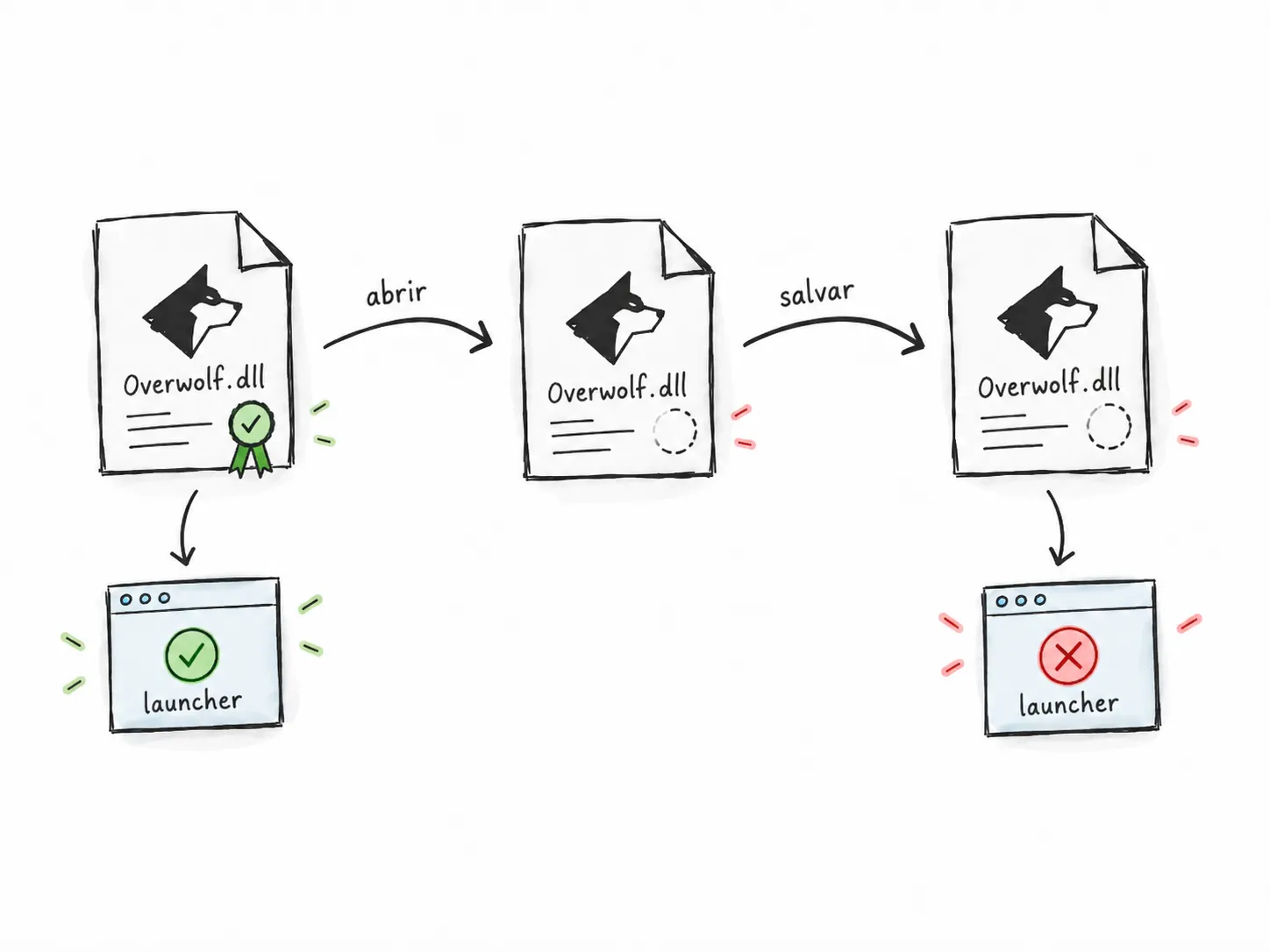
Figure 5. Launcher verification prevents the rewritten DLL from reaching the runtime, even when no method was deliberately changed.
At this point, two facts were clear:
- the desired response could be expressed as valid IL
- any solution that rewrote the installed DLL would be rejected before execution
The useful question was no longer which IL to write. I needed to find a point where I could intervene without changing the file verified by the launcher.
The useful boundary lay between the validated file and native code
A .NET assembly does not go directly from disk to the CPU. The DLL contains IL, the CLR loads the assembly, and the JIT (just-in-time compiler) normally turns methods into native code when they are needed.
flowchart TD
    A[DLL on disk] -->|Contains IL| B[CLR loads the assembly]
    B --> C[JIT compiles the method]
    C -->|Produces native code| D[CPU executes]
Figure 6. Simplified path from the installed DLL to code executed by the CPU.
The signature protected the file inspected by the launcher. Once the process had started, the state of a method could still change.
A viable alternative had to satisfy three conditions:
- keep the original DLL intact and validly signed on disk
- intervene before the method became executable native code
- change the result only for Outplayed while preserving Core behavior for other extensions
There was a usable window. The challenge was to reach it early enough.
Redirecting the method entry point was too late
My first in-memory attempt used an AppDomainManager to enter early in initialization and redirect both methods to implementations generated at runtime.
In the fixture, I redirected GetExtensionSubscriptions, but not GetExtensionSubscriptionsIds. The difference was inlining.
In a normal call, there is a method entry point to intercept: caller → GetExtensionSubscriptionsIds → result.
The JIT can instead copy the body of a small method directly into its caller, as shown in Figure 7.
flowchart TB
    subgraph S[Without inlining]
        A1[caller] --> B1[GetExtensionSubscriptionsIds]
        B1 --> C1[result]
    end
    subgraph I[With inlining]
        A2[caller] --> B2[body copied into the caller]
        B2 --> C2[result]
    end
Figure 7. With inlining, the method entry point is no longer a reliable place to redirect execution.
Marking the fixture with NoInlining made the test pass. This confirmed that redirection worked only if I arrived before an optimization I did not control.
The fallback failed as well. I had saved a delegate to the original implementation so that I could call it for UIDs other than Outplayed. After redirection, however, that delegate still entered through the same address I had replaced:
flowchart TD
    A[Replacement] --> B{Is this the target UID?}
    B -->|No| C[Call the original implementation]
    C --> D[Entry point is already redirected]
    D --> A
Figure 8. The fallback returned to the redirected entry point and restarted the same flow.
The result was a StackOverflowException.
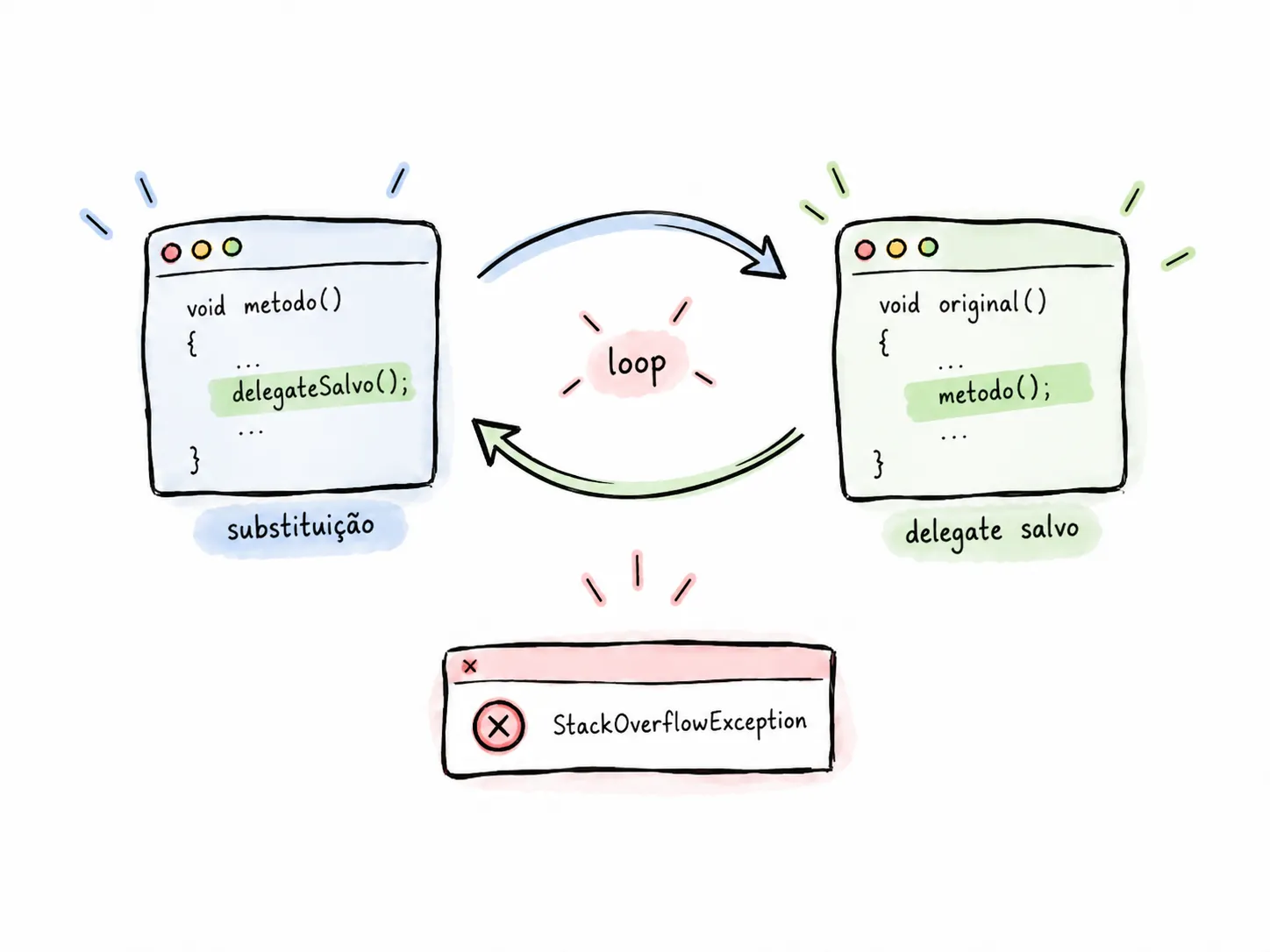
Figure 9. The delegate preserved a reference to the same entry point, not an independent route to the previous body.
I also tried capturing a pointer before the swap. That led to problems with Marshal.GetDelegateForFunctionPointer, managed arrays, calling conventions, and a calli attempt that ended in an InvalidProgramException.
These attempts failed in different ways, but they all pointed to the same problem. I was trying to recover the original body after the runtime had already begun preparing, compiling, and optimizing the method. I was still arriving too late.
The pre-JIT callback provided the right interception point
The CLR profiling API is commonly associated with performance tools, but it also allows a native DLL to receive callbacks for internal runtime events.
Two features provided the mechanism I needed:
JITCompilationStarted, called when the CLR is about to compile a functionSetILFunctionBody, which supplies a different IL body before compilation
Together, they allowed the original file to pass WinTrust unchanged. Only after loading, immediately before JIT compilation, would the profiler provide an alternative body:
flowchart TD
    A[Original signed DLL] -->|WinTrust accepts it| B[CLR loads the assembly]
    B --> C[Method reaches the JIT]
    C -->|Profiler supplies another IL body| D[JIT compiles the supplied body]
    D --> E[CPU executes]
Figure 10. IL replacement happens after file validation and before native compilation.
In practice, the launcher verified the original file while the runtime compiled the body supplied in memory.
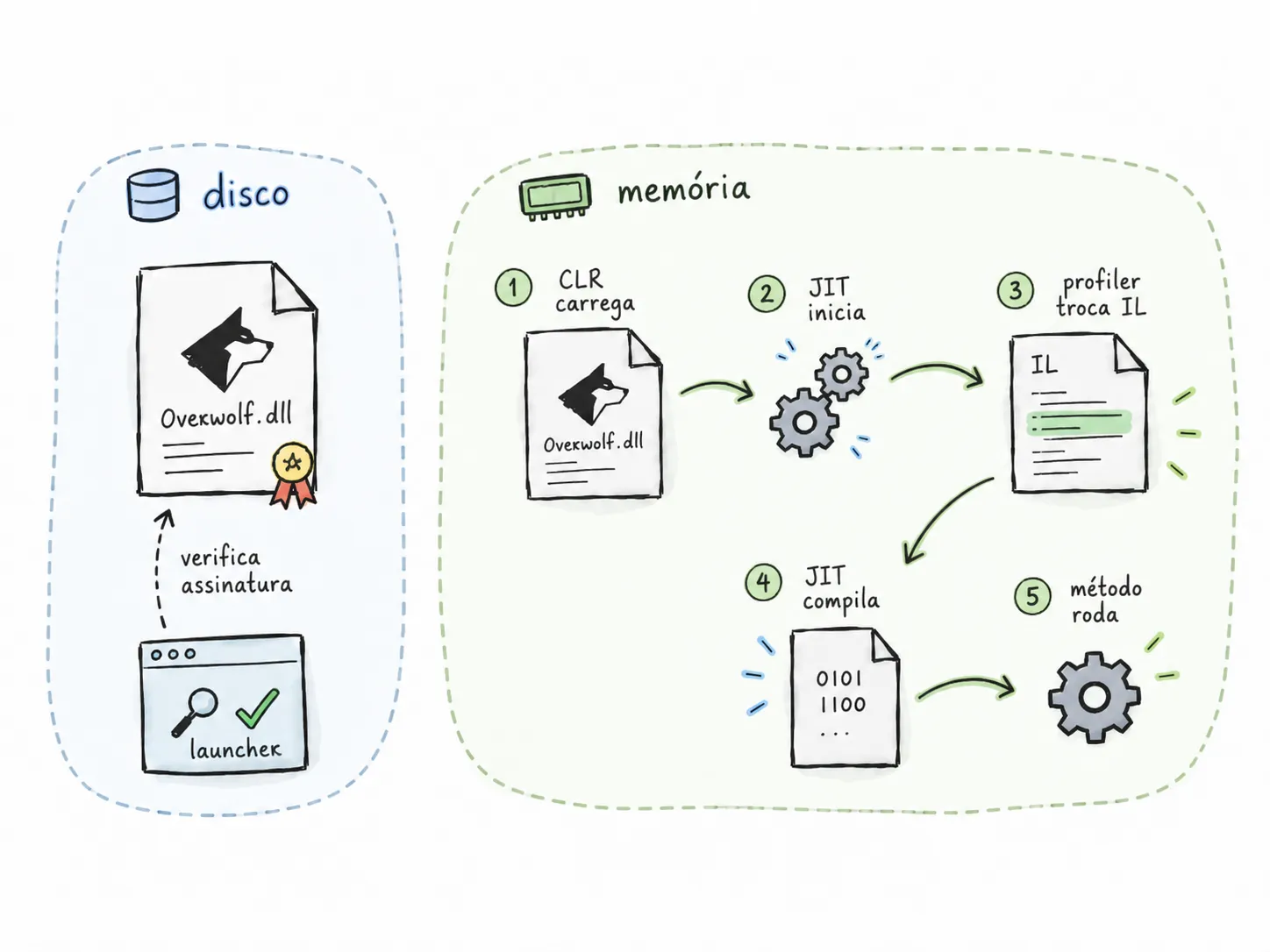
Figure 11. The signed file remains intact. The replacement exists only inside the process, before native compilation.
The profiler was a native x64 DLL written in C++. When a function reached the JIT, the callback obtained its module and metadata token, checked whether it was one of the two targets, and transferred the new body using memory supplied by the CLR:
info->GetILFunctionBodyAllocator(module, &allocator);BYTE *destination = reinterpret_cast<BYTE *>( allocator->Alloc(static_cast<ULONG>(body.size())));CopyMemory(destination, body.data(), body.size());hr = info->SetILFunctionBody(module, method, destination);allocator->Release();There was no longer a Write() call or a modified copy of OverWolf.Client.Core.dll for WinTrust to reject. The remaining requirement was to preserve Core behavior for every extension other than Outplayed.
The original fallback became part of the new body
Changing the return value globally would have been a poor experiment. These methods belonged to a shared component and could be called by other extensions.
The intended behavior was conditional:
if the UID belongs to Outplayed: return the experimental resultotherwise: execute the original behaviorThe delegate had failed because it tried to return to an entry point that was already redirected. With SetILFunctionBody, I could avoid that external call. The profiler built a composite body consisting of a decision prefix followed by the original instructions.
ldarg.0call get_UIDldstr "target extension identifier"call string::op_Equalitybrfalse ORIGINAL
// Build and return the experimental result.ret
ORIGINAL:// Original instructions copied into the same body.
If the UID matched Outplayed, the method returned the altered result. Otherwise, brfalse continued into the original code within the same method.
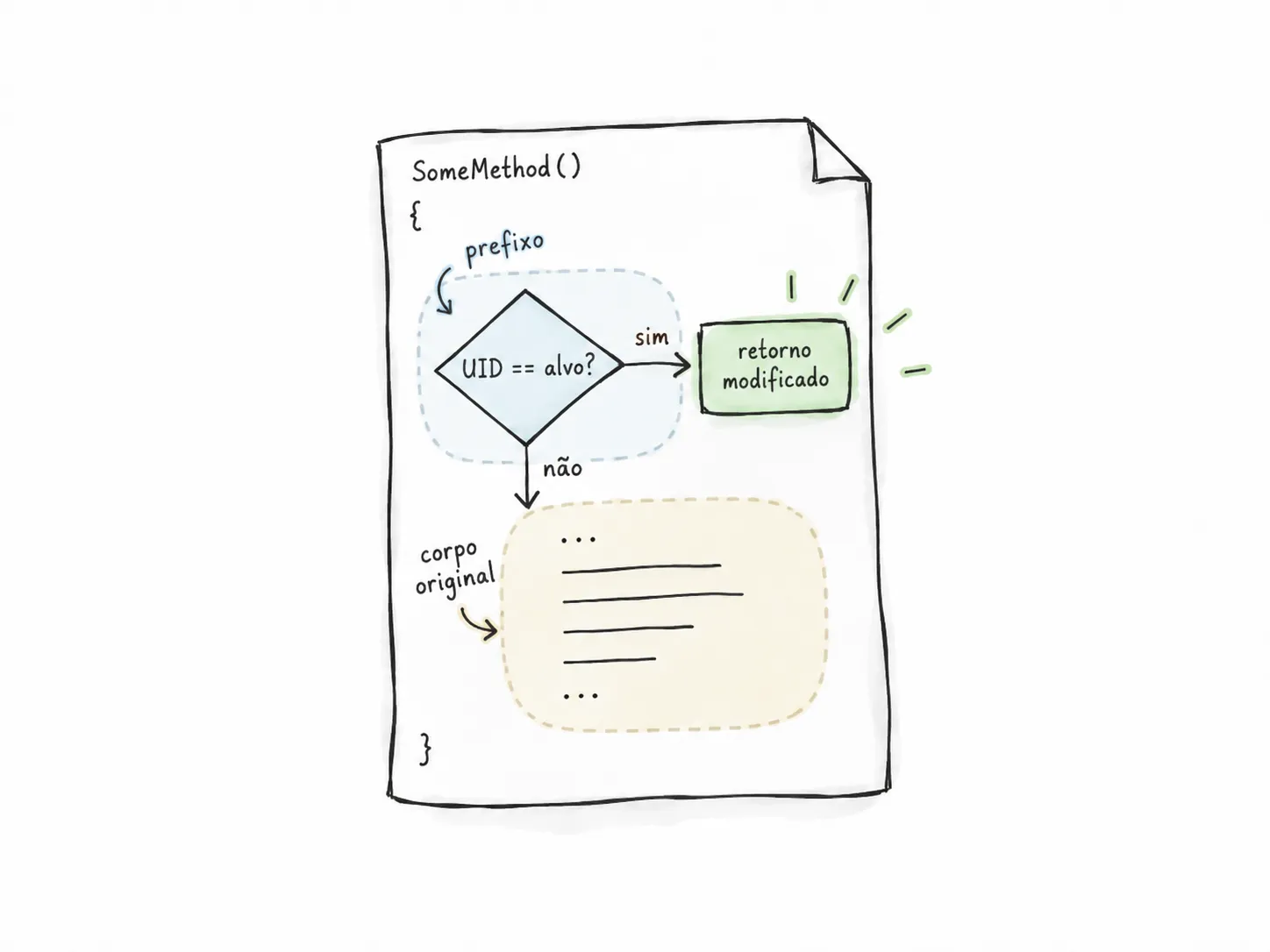
Figure 12. The experimental and original paths coexist in the same IL body, so no delegate can accidentally return to the redirected entry point.
This composition fixed the recursion but introduced another technical problem: moving the instructions also moved the method’s internal coordinates.
Preserving the IL required preserving the method structure
A .NET method body contains more than a sequence of opcodes. It also describes local variables and exception regions such as try, catch, finally, and filters. Some of those fields refer to positions inside the method.
After inserting a prefix of length P, all previous instructions begin P bytes later. Relative branches remain correct because their source and destination move together. Offsets measured from the beginning of the method do not.
The same field in an exception clause can represent a type token for catch or, depending on the flags, a filter offset:
const ULONG classOrFilter = (clause.flags & 0x1u) != 0 ? clause.classOrFilter + static_cast<ULONG>(originalEntry) : clause.classOrFilter;If the field contains an offset, it must move with the code. If it contains a class token, adding bytes corrupts the reference. The builder also preserved the local-variable signature, the initialization flag, and the rest of the header required by the JIT.
Copying the original body therefore involved much more than concatenating bytes. I had to reconstruct an executable method. Even then, the equivalence has a limit: the prefix calls the UID getter before the previous body, and my tests do not cover every caller or every possible state.
Method tokens are not universal identifiers
The profiler located its targets using metadata tokens. A value such as 0x060030B7 has meaning only within a specific version of an assembly. In another build, the same value can refer to a different method.
Before replacing any body, the implementation therefore validated:
- architecture
- the DLL’s SHA-256
- MVID (Module Version ID)
- expected tokens and metadata
If the assembly was not the exact version I had investigated, the profiler refused to modify it. The intervention remained specific to that version instead of claiming compatibility with builds I had never analyzed.
I also had to ensure that the methods actually reached the JIT. Inlining could remove the interception point, and native NGEN images could cause the .NET Framework to use previously compiled code. The instrumented process disabled both.
The final architecture was:
- the original DLL remains on disk
- the launcher validates its signature
- the CLR loads the assembly
- the target method reaches the JIT
- the profiler supplies a composite body
- the JIT compiles that body
- the target UID receives the experimental result
- all other UIDs continue through the original instructions
Each requirement was now handled at the right point in the flow, without trying to undo a stage the system had already completed.
The mechanism worked, but the effect still had to be validated
An x64 fixture could tell me whether the CLR loaded the profiler, whether SetILFunctionBody accepted the body, and whether the JIT could compile it. It could not show whether the real Outplayed application would make a different decision.
I split validation into four questions:
- does the CLR load the profiler?
- does the API accept the constructed body?
- does the JIT compile and execute that body?
- does the real application change its behavior because of it?
I added intermediate modes to the launcher: a baseline without instrumentation, bootstrap to load the infrastructure, observe to record callbacks, and neutral to supply bodies equivalent to the originals. Only then did I run the mode that changed the responses.
This separation made failures easier to locate. If bootstrap failed, no new IL would have been installed. If neutral failed, the problem would be in the instrumentation rather than plan 61.
The environment introduced another limitation. Under a restricted automation account, Overwolf exited before reaching the target methods with Failed to initialize CEF runtime. The full test had to run in the interactive account used by the application.
In that session, the logs confirmed that the real Core reached the callback and compiled the replaced method:
2026-09-08T21:09:08.275Z JIT target started function=0x7FFEC3916450 token=0x60030B72026-09-08T21:09:08.284Z premium SetILFunctionBody detailed=ok ids=ok rollback=ok2026-09-08T21:09:08.285Z Core JIT finished function=0x7FFEC3916450 token=0x60030B7 status=0x0This log supports a narrow conclusion: the Core reached the callback, accepted the supplied bodies, and completed compilation of the method returning plan details. By itself, it does not prove every visual change, nor does this excerpt record an independent execution of the ID method.
The result changed a local path, not the account state
In the configuration, premium was only the name of the instrumentation mode:
mode = premiumapp = cghphpbjeabdkomiphingnegihoigeggcfphdofoplans = 61--app selected the UID that should follow the new path, while --plans specified the IDs returned by the two local methods. For the version of Outplayed I analyzed, the observed value was 61.
The profiler did not create a Tebex subscription or alter server-side records. It changed two responses produced by the Core for one UID, as summarized in Figure 13.
flowchart TD
    A[Server and Tebex] -->|Remains unchanged| B[Account state]
    C[GetExtensionSubscriptions] -->|Response changed for the target UID| E[Local decisions]
    D[GetExtensionSubscriptionsIds] -->|Response changed for the target UID| E
Figure 13. The intervention changed local responses without modifying the account state on the server.
Execution logs recorded that the profiler targeted only the managed Overwolf.exe process and that the installed files remained intact. Launching Overwolf normally, outside the profiling environment, removed the instrumentation.
In the session I observed, the “Go Premium” button disappeared, the ads were no longer visible, and the option to hide the game layout became available. At the same time, the plan screen still showed Outplayed Core - Free.
The two states can be compared directly in Figure 1.
This result fits the reconstructed architecture. The legacy provider still influenced part of the local behavior, while the account state and server-dependent benefits followed a different path.
It does not show that the entire application became premium. It also does not prove that the two responses alone caused every visual change. The absence of ads may depend on other conditions, a single run does not establish persistence, and features validated by the server were outside the scope of this test.
The root cause was the timing of the intervention
I began by treating the failure as a compatibility problem between the generated IL and the current Core version.
That line of analysis found a real bug. The implementation emitted a float where the version under test expected a double. The fixture showed that the corrected IL worked. Even so, Overwolf rejected the DLL before executing it.
The test that changed the investigation was also the simplest: open a clean copy of the Core with Cecil and write it back without changing any methods. WinTrust rejected the rewritten copy even though the comparison found 0 differences across 16,992 methods.
That separated two problems that had looked like one:
The IL body had to be updated.
The delivery mechanism was no longer compatible with the system.
The on-disk approach assumed that the installed DLL could be replaced before initialization. The launcher verified the signed integrity of that same DLL before loading it. Correcting the IL without changing the interception point could never be enough.
The question that unlocked the problem was:
At what point has the file already been accepted, but its behavior has not yet become native code?
The answer was immediately before JIT compilation. The signed DLL remained on disk. When either target method was about to be compiled, the profiler supplied a composite body: the Outplayed UID followed the experimental path, while every other UID executed the original instructions embedded in the same method.
At first, I was trying to change what was in the file. The solution appeared when I started investigating when the change needed to happen: after WinTrust and before the JIT.